Compress GIFs on Windows: 3 Methods
Compress GIFs on Windows with GetCompress, Clipchamp MP4 export, or FFmpeg. Trim, shrink width, or switch to MP4 when the tool allows video.
A 15-second UI demo as GIF can hit 20 MB. The same clip as MP4 is often 1 to 2 MB. Design critiques and bug tickets still ask for GIF sometimes, but many tools now accept video. When GIF is mandatory, shorten the loop, reduce width and fps, and use a proper palette encode. Keep unreleased product UI off random upload sites.
Three solid routes cover most Windows jobs: GetCompress for local GIF work with preview, Clipchamp when MP4 is allowed, and FFmpeg when you need palette flags or a folder script.
Method 1: GetCompress
Best for: Shrinking an existing GIF, or making a GIF from MOV or MP4, with trim and frame preview before you attach it to a ticket.
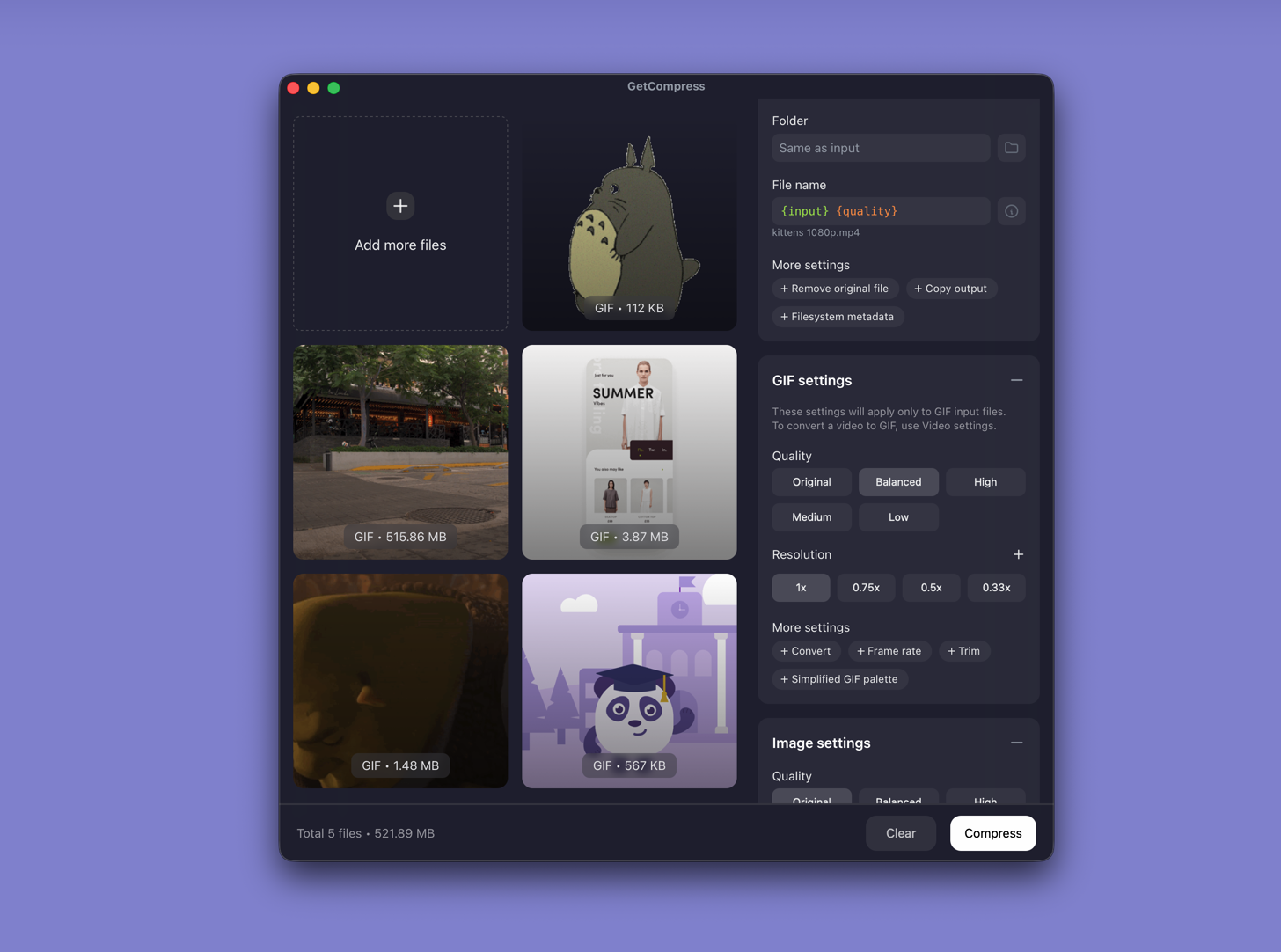
- Open GetCompress and drop a GIF, or drop video to create a GIF from source.
- Trim idle frames in the preview.
- Set width (640 or 800 px covers most forms) and frame rate, then export.
- If the thread allows video, export MP4 instead and skip GIF entirely.
Processing stays on your PC. Save a preset such as “bug GIF 640w 10fps” for repeat QA clips. Ask in the thread whether video is allowed before you spend time on palette tuning. When video is allowed, see convert GIF to MP4 on Windows .
Method 2: Export MP4 in Clipchamp
Best for: One screen recording when Teams, Notion, or your tracker accepts video.
- Open the recording in Clipchamp.
- Trim the timeline to the action only.
- Export at 720p.
Upload MP4. File size drops with full color. Reserve GIF for tools that block video. Screen recordings with small UI text often look sharper in MP4 than in a palette-limited GIF.
Limitation: Clipchamp does not re-palette an existing GIF with fine control. If GIF is mandatory, use Method 1 or 3.
Method 3: FFmpeg palette pipeline
Best for: Exact fps and width flags, and batch re-encode of oversized GIF files.
Install FFmpeg with winget:
winget install --id Gyan.FFmpeg -eFrom MP4:
ffmpeg -i clip.mp4 -vf "fps=10,scale=640:-1:flags=lanczos,split[s0][s1];[s0]palettegen[p];[s1][p]paletteuse" -loop 0 clip.gifRe-compress an existing GIF:
ffmpeg -i big.gif -vf "fps=10,scale=640:-1:flags=lanczos,split[s0][s1];[s0]palettegen[p];[s1][p]paletteuse" -loop 0 clip-small.gifBatch a folder:
mkdir gif-out
Get-ChildItem *.gif | ForEach-Object {
 ffmpeg -i $_.Name -vf "fps=10,scale=640:-1:flags=lanczos,split[s0][s1];[s0]palettegen[p];[s1][p]paletteuse" -loop 0 "gif-out\$($_.Name)"
}| Parameter | Smaller file | Better quality |
|---|---|---|
fps | 8 | 12 to 15 |
scale width | 480 to 640 | 800 to 960 |
| Source trim | Shortest usable clip | Full interaction |
Trim in Clipchamp before FFmpeg. Keep originals until you verify text readability in File Explorer and the target app.
Limitation: You maintain the commands. Palette flags can drift between machines if each engineer keeps a private script.
Which method should you use
| Situation | Start here |
|---|---|
| Recurring bug GIFs, preview, or video-to-GIF | GetCompress |
| One clip and video is allowed | Clipchamp MP4 |
| Scripts or exact palette flags | FFmpeg |
Creating GIF from video: video to GIF on Windows . Still images: how to compress images on Windows .
Why GIF files get large
GIF stores a full raster per frame and caps at 256 colors. Screen recordings with gradients and anti-aliased text are expensive.
| Factor combo | Rough outcome |
|---|---|
| 15 s, 1920 px, 15 fps | Often 15 to 25 MB |
| 5 s, 640 px, 10 fps | Often 2 to 6 MB |
| Same clip as MP4 720p | Often 1 to 2 MB |
Azure DevOps and older Jira instances sometimes show attachment size only after upload fails. Export at 640 px first, note the size in Explorer, then attach.
When Clipchamp or FFmpeg is enough
Clipchamp can work when one MP4 export is ready to send. FFmpeg is enough when the team already shares one PowerShell recipe.
GetCompress also helps when QA batches several repros after a test day, when contractors need the same width and fps without installing FFmpeg on every laptop, or when design drops an oversized GIF and you only need a smaller attachment. Prefer MP4 or static PNG for docs when quality stays poor at small GIF size. It does not replace a motion tool for authoring loops from scratch.
- Convert GIF to MP4 on WindowsConvert GIF to MP4 on Windows with GetCompress, Clipchamp when you still have video, or FFmpeg. Smaller files and smoother motion with full color.
- Convert Video to GIF on WindowsConvert MOV or MP4 to GIF on Windows with GetCompress, Clipchamp (for MP4), or FFmpeg. Trim first, keep width low, and ask if video is allowed.
- How to Compress Images on WindowsCompress images on Windows with GetCompress, Photos, or FFmpeg. Resize JPG and PNG, convert WebP, and keep sharp UI for email or web.
- Compress GIFs on MacCompress GIFs on Mac with GetCompress, QuickTime MP4 export, or FFmpeg. Trim, shrink width, or switch to MP4 when the tool allows video.