Export PDF to Images on Windows: 3 Methods
Turn PDF pages into PNG or JPEG on Windows with Edge, pdftoppm, or a resize pass in GetCompress. Batch slide decks without online splitters.
You need slide images for design review, a blog figure from a report, or PNG thumbnails for a CMS. The full PDF is the wrong shape for those workflows. Export pages as PNG or JPEG, then resize for screen width. Raw page files are often 2000 to 4000 px wide and too heavy for Teams or email.
When pages as images help
| Use case | Typical output |
|---|---|
| Slide review in Figma or Teams | PNG per slide, about 1920 px wide |
| Blog figure from a report page | JPEG at display width |
| LMS thumbnail grid | Smaller JPEG |
| Signed scan archive | Keep the PDF; export only if required |
Exporting pages does not replace a compressed PDF for email. Prefer PNG for thin charts and UI text. Prefer JPEG for photo-heavy slides. Dedicated paths: PDF to JPG on Windows , PDF to PNG on Windows . Reverse merge: JPG to PDF on Windows .
Method 1: Export one page in Edge
Best for: One or two pages without installing tools.
- Open the PDF in Microsoft Edge.
- Go to the page you need.
- Use Save as image if your viewer version offers it, or carefully screenshot without UI chrome.
- Crop in Photos or Paint if needed.
Limitation: Does not scale to forty slides. Screenshots can pick up browser chrome.
Method 2: Batch with pdftoppm
Best for: Whole decks and predictable filenames for scripts.
winget install poppler
pdftoppm -png deck.pdf deck-page
That creates deck-page-1.png, deck-page-2.png, and so on. For JPEG:
pdftoppm -jpeg -jpegopt quality=85 deck.pdf deck-pageExport pages 3 through 5 only with -f 3 -l 5. Unlock password-protected files in Edge and re-save without security before pdftoppm.
Limitation: No GUI preview. You still need a resize pass for most uploads.
Method 3: Resize and compress in GetCompress
Best for: Making the exported image folder fit Teams, Notion, or SharePoint after Method 1 or 2.
GetCompress does not split PDF pages. Export first, then:
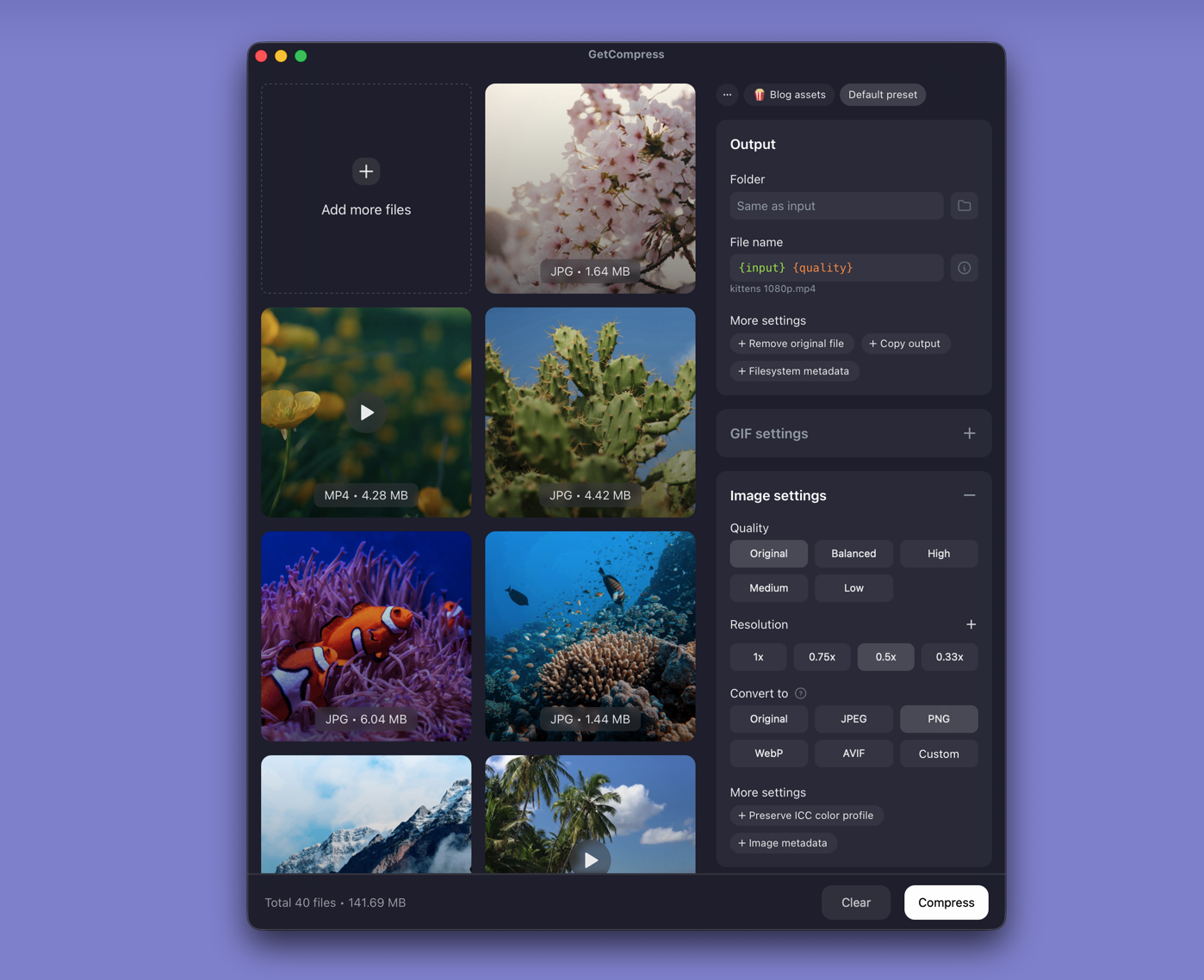
- Drop the exported PNG or JPEG folder into GetCompress .
- Set max width (often 1920 px) and output format.
- Preview a chart page and a photo page, then export.
- Save a preset if you export decks every week.
Processing stays on your PC. Image compression uses quality and dimensions, not an exact target file size.
Which method should you use
| Situation | Start here |
|---|---|
| One chart or slide | Edge (or Paint crop) |
| Whole deck split | pdftoppm |
| Folder still too large after export | GetCompress |
Quick resize with FFmpeg:
winget install --id Gyan.FFmpeg -e
mkdir out
Get-ChildItem deck-page-*.png | ForEach-Object {
 ffmpeg -i $_.Name -vf scale=1920:-2 "out\$($_.Name)"
}
More image options: how to compress images on Windows . To keep one file: how to compress PDF on Windows .
Check before you upload
Spot-check one chart page and one photo page at 100% zoom. Keep full-resolution exports until reviewers approve the resized set. Keep the source PDF as the signed reference when needed.
When a manual Edge save is enough
A manual Edge save can finish a single page when the export already fits the destination.
GetCompress fits after pdftoppm when many pages need the same width and format before upload. It does not replace a PDF editor. Prefer local export for confidential decks instead of online splitters.
- Convert PDF to JPG on WindowsExport PDF pages as JPEG on Windows with Edge, pdftoppm, or a GetCompress resize pass. Batch slide decks for CMS and SharePoint.
- Convert PDF to PNG on WindowsExport PDF pages as PNG on Windows with Edge, pdftoppm, or a GetCompress resize pass. Keep text and charts crisp for design review.
- Convert JPG to PDF on WindowsCombine JPG images into one PDF on Windows with Microsoft Print to PDF, set page order, then shrink the file if Outlook or a portal rejects it.
- How to Compress PDF on WindowsCompress PDF on Windows with GetCompress, PowerPoint re-export, or Ghostscript. Shrink decks and scans for Outlook and portals.